GMail recently added a new feature to the standard mail account, "Priority Inbox". At first thought, I was dubious as to how well it would work, thinking it would get in the way more than it would help, but I was happily surprised. The prioritization process is apparently based off of their spam filtering algorithms, just kind of in reverse. Mail from your contacts, people who's email you actually read immediately, and those you send email to will show up in the Priority area of your inbox, while the other email you receive go to the standard inbox section.
It seems to be working very well for me. I recieve newsletters that I go over when I have spare time and other informational emails that are definitely not something I need to read right away. All of these tend to go to my normal inbox. Meanwhile, the important emails are usually ending up in the Priority Inbox. If an item ends up in the wrong section, just tag it as priority and the filter will put it in the correct section and "learn" what is important to you in your email.
As always, I went to check out what Gina Trapani thought about the new features:
Gmail Priority Inbox Puts Important Messages First | Smarterware: "Just completed my first email sweep with Gmail's new 'Priority Inbox' feature enabled, and it's a keeper. Over time, if this mechanism proves to be as good as Gmail's top-notch spam filtering, it could be the reason why you only check Gmail in the browser. (Well-played, GOOG.)"
I must say, I agree, well done Google.
Tuesday, August 31, 2010


Friday, August 27, 2010
So far, I like the phone addition in GMail
I've been trying out the new feature in GMail over the last couple days that allows you to make phone calls from your computer. I have been a big fan of Google Voice for quite a while now and use it as my primary point of contact. I only really have one problem, nobody ever calls me. It's kind of funny actually, but I never noticed it really until I sat down to write this out. The only people who actually call my Google Voice number are responding to applications I put with their companies, but I am getting off-track here.
I made a few calls and only one person said that there was any issue with the call quality, and he was on a cell phone, so it is quite possible that it was not on my end. The call quality is great on my side, and it's nice having all of my contacts easily found by name or phone number as I type them into the interface.
Overall, I am a happy customer right now. I have no plans to get rid of my other phones any time soon, but it's a great step in the right direction Google!
I made a few calls and only one person said that there was any issue with the call quality, and he was on a cell phone, so it is quite possible that it was not on my end. The call quality is great on my side, and it's nice having all of my contacts easily found by name or phone number as I type them into the interface.
Overall, I am a happy customer right now. I have no plans to get rid of my other phones any time soon, but it's a great step in the right direction Google!
Thursday, August 26, 2010
Make and Receive Phone Calls from Gmail
Make and Receive Phone Calls from Gmail: "Make and Receive Phone Calls from Gmail
Google has just announced that starting today, U.S. based Gmail users will now be able to place and receive phone calls directly from the Gmail interface. Calls placed to U.S. and Canadian-based numbers are free, and if you need to make international calls, the rates are extremely cheap. Check it out:"
Google has just announced that starting today, U.S. based Gmail users will now be able to place and receive phone calls directly from the Gmail interface. Calls placed to U.S. and Canadian-based numbers are free, and if you need to make international calls, the rates are extremely cheap. Check it out:"
Wednesday, August 25, 2010
Free Phonecall Integration on Its Way to Gmail?
Free Phonecall Integration on Its Way to Gmail?

Ahhh, I hope this is really on the way. I have seen leaks of a Google Voice desktop application online, but this looks like we are one step closer to being able to really make free phone calls from Google without jumping though hoops with other 3rd party tie-ins.

Ahhh, I hope this is really on the way. I have seen leaks of a Google Voice desktop application online, but this looks like we are one step closer to being able to really make free phone calls from Google without jumping though hoops with other 3rd party tie-ins.
Tuesday, August 24, 2010
Evernote - One Note-taking app to rule them all
 I first learned about Evernote from reading about it on Lifehacker. Since then, I have tried various note-taking applications, web sites, and methods. Evernote keeps me coming back with it's wide variety of uses and tools.
The Evernote web-clipper is extremely useful. I have used both the Firefox and Chrome add-ons as well as bookmarklets, and they work beautifully. You simply highlight the items you need to take note of for future reference, click on the add-on or bookmarklet, add a title and maybe a comment or two and voila, that's it. A fully searchable, taggable, linked note is in your notebook. Evernote can even use OCR to scan uploaded pictures and PDFs to allow any text contained therein to be found in searches.
The desktop application also works wonderfully, allowing you to use hot-keys to control your note-taking is a very useful feature that I use quite often. Because my Evernote account has everything stored on the web, all of my instances of the service remain in sync. If I wanted to take a note while on a smart-phone, I would be able to retrieve and interact with it from my desktop application or on the website almost immediately.
Some common uses for my Evernote account:Shopping Online
- Class Notes
- Research (work and school)
- Grocery lists
- Birthday ideas
Evernote
For other information check out the various posts on Lifehacker.com regarding Evernote HERE.
Windows Intune Beta
Windows Intune Beta: "


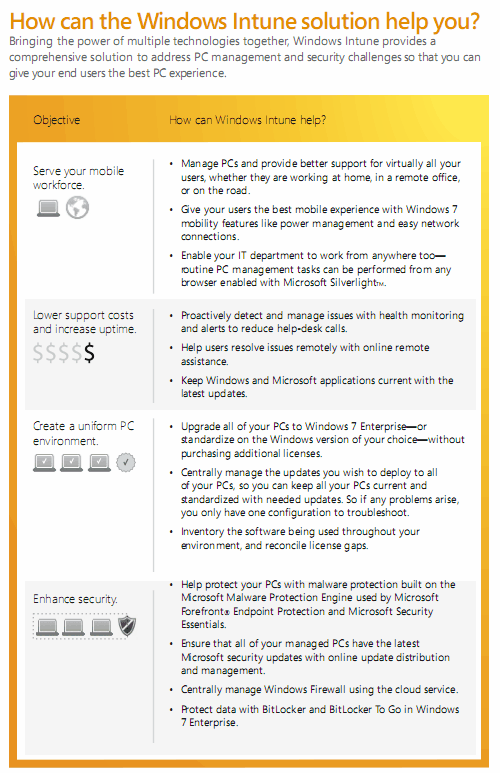
Microsoft has just announced the availability of Windows Intune Beta as part of Microsoft Online Services. Windows Intune is a cloud based PC management service for businesses and organizations. Microsoft calls it a “comprehensive solution that includes PC management, malware protection, Windows upgrades, and more”.
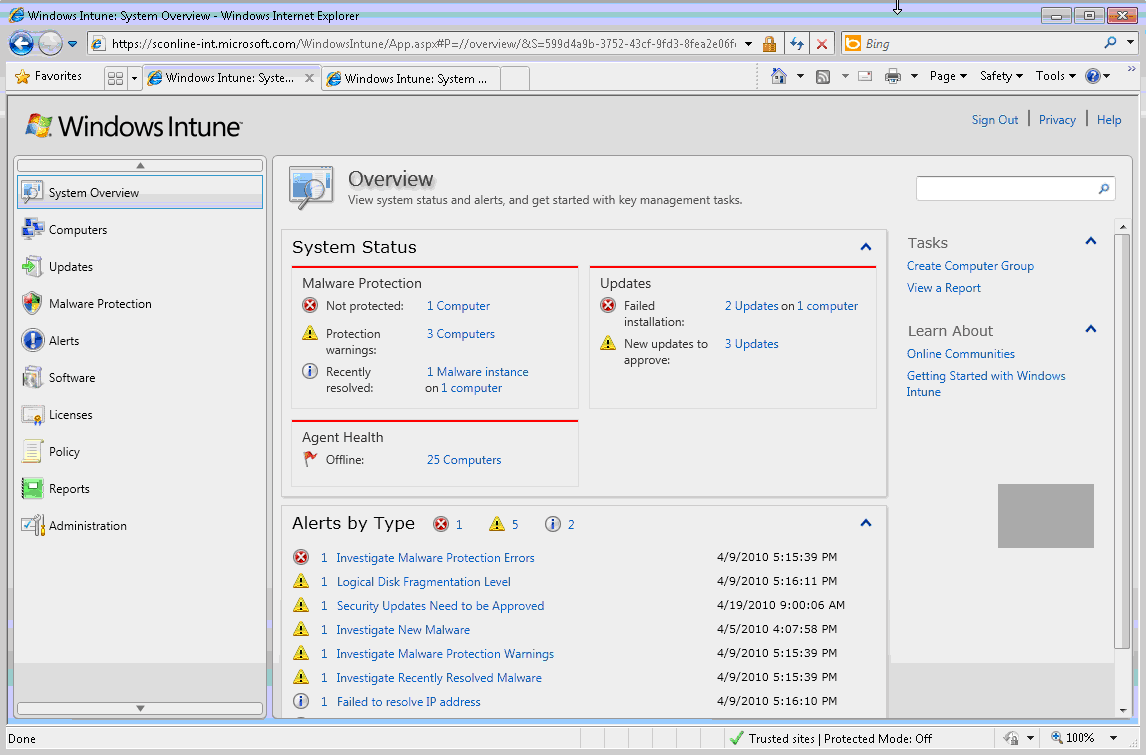
The Windows Intune cloud service gives IT professionals and system administrators the tools at hand to manage and secure PCs through a web-based console, which essentially means that it is possible to manage the PCs from any computer with Internet connection.
In order to use the service, you just need an Internet connection and the Windows Intune client installed on each PC you wish to manage. Windows Intune can be used by inhouse IT professionals to manage the PCs at their organization or by solution providers to manage the PCs of multiple businesses.
windows intune
Windows Intune offers the following feature set:
- Manage updates: Centrally manage the deployment of Microsoft updates and service packs to all PCs.
- Protect PCs from malware: Help protect your PCs from the latest threats with malware protection built on the Microsoft Malware Protection Engine that you can manage through the Web-based console.
- Proactively monitor PCs: Receive alerts on updates and threats so that you can proactively identify and resolve problems with your PCs—before they impact end users and your business.
- Provide remote assistance: Resolve PC issues, regardless of where you or your users are located, with remote assistance.
- Track hardware and software inventory: Track hardware and software assets used in your business to efficiently manage your assets, licenses, and compliance.
- Set security policies: Centrally manage update, firewall, and malware
Windows Intune is currently offered as a limited beta, the first 10000 users who signup for the beta may participate.
Windows Intune
Windows Intune requirements:
- Windows 7 Enterprise, Ultimate and Professional
- Windows Vista Enterprise, Ultimate, and Business
- Windows XP Professional Service Pack (SP) 2 or SP 3 (recommended)
- The Windows Intune client software has no additional hardware requirements for Windows 7 or Windows Vista-based computers. However, to install the client software on Windows XP-based computers you will need a CPU clock speed of 500 MHz or greater and at least 256 MB of RAM.
- To access the Windows Intune Web console, administrators will need access to a Web browser that supports Silverlight 3.0, such as Internet Explorer 7.0 or higher.
- The Windows Intune cloud service beta may be used on up to 25 seats. In order to ensure we collect quality feedback, please deploy the service on at least five PCs.
Windows Intune seems to lack several features at this point in time that are essential for system administrators and It Pros, including
- No Windows Server support
- No OS or software deployment
- No scripting support
Head over to the official website to try the beta right now.
© Martin for gHacks Technology News, 2010. | Permalink | Add to del.icio.us, digg, facebook, reddit, twitter
Post tags: intune, intune beta, microsoft online services, pc management, windows intune
Subscribe to:
Posts (Atom)