Note to self: Check this out.
See this Amp at http://amplify.com/u/jz2d
Who said IT Security has no sense of humor?
Data security breach at the North Pole! Santa's Naughty/Nice list compromised
Filed Under: Data loss, Featured, Privacy, SophosLabs
Following attacks on Gawker, Walgreens and McDonalds, it seems hackers have set their eyes on a new target: Santa!
Reports from the North Pole have confirmed that Santa's Naughty/Nice list has been compromised.
The list is said to contain the name, stocking address and naughty/nice score (the child equivalent of a credit score) of every child on earth. Absent from the leaked data is the "What I want for Christmas" list which is said to be stored in a separate database.
While St. Nick is not commenting on how the leak occurred, an insider elf mentioned a spear phishing campaign a few days ago promising milk and cookies after logging in to a suspicious site.
In the meantime, Santa is asking children to reset the password on their stockings. Santa's workshop has also set up a hotline for children who get coal in their stockings on Christmas day due to any mix up.
This attack and others are a reminder to all that sending spam will land you on the naughty list, even if you manage to get a copy of that list.
Hat tip: Thanks to SophosLabs researcher Tareq Alkhatib for bringing this breaking news story to our attention.
This is a rather well explained article on why your password is probably not good enough that also give some good advice on how to make easy to remember, yet secure passwords in order to protect yourself online.
The end of the year is coming up fast for us to take advantage of the permanent ComptTIA certifications.
The Certifications That Matter Most
Every once in a while, IT training gurus step back and compile a list of the certifications that seem to matter most at that particular moment. The latest list, via Infoworld, is out now, and you can use it as a planning tool if you want to direct your career in a new direction. The highlights:
Microsoft (MCSE, MCITP, MCTS)
Few businesses get along without a hearty helping of Microsoft-powered equipment, and the company offers a raft of specialized training programs for those who service its products
CompTIA (A+, Network+, Security+, Linux+)
The nonprofit Computing Technology Industry Association offers popular vendor-neutral certifications--a good option if you're seeking a consultant who has a mix of experience beyond a single brand. Among the certification options, the basic A+ [8] requires 400 hours of hands-on experience.
Cisco (CCNP, CCNA, CCiE)
Among the most popular certifications in the industry, the basic Cisco Certified Network Associate (CCNA) covers installing and managing medium-size networks. It requires a passing mark on a $250 exam, and certification lasts for three years.
Apple (ACSP, ACTC)
A help-desk pro with Microsoft skills may not know how to manage Macs. For shops that rely on Apple products or use a mix of operating systems, Apple Certified Support Professional (ACSP) and Apple Certified Technical Coordinator (ACTC) cover basic support skills as evidenced by passing marks on tests that cost $200 and $400, respectively.
International Information Systems Security Certification Consortium (CISSP)
If your company deals with proprietary information and has deep security needs, Certified Information Systems Security Professional (CISSP) certification is known to be rigorous. People who qualify for it must have worked for at least five years in areas such as security architecture and design, and then must pass a $599 exam and pay an annual renewal fee.
Information Systems Audit and Control Association (ISACA)
This advanced certification is reserved for IT security consultants and auditors with five years' experience. The test costs $415 or more. Tech consultants who earn this seal of approval enjoy a median annual salary of $87,000.
Project Management Professional (PMP)
This well-respected certification is for people with some college education and at least three years of project management experience. The median salary for PMP-certified IT project managers is $89,000.
There are a lot of programs out there to take advantage of if you are able, ready and willing.
Isabell's idea: Proving green girl geeks are cool
Isabell's idea reflected her green interests. She had spotted that various government departments were now publishing data about their own energy use, but it was spread over a number of different websites.

If this come to be a real production tablet, I will have to get my hands on one. Even if it means going back to the days of the humongous phone, it would totally be worth it to me.
[HD] Galaxy Tab Official Live Demo
This is the first official hands-on video that contains a demonstration of every key feature and benefit of the Samsung Galaxy Tab. It also contains information of the most frequently asked features from social networking sites.
Read more at www.youtube.com
Most importantly, it highlights the value proposition of the Galaxy Tab: Advanced Media, Productivity and Communication, and On the Go.
This video doesn't contain any graphic effects.
Microsoft Releases Free Cyber-Security Ebook
Microsoft has released a free—and lengthy—ebook covering a wide range of security topics. Although intended for teenagers, the book offers a solid enough look at using the internet safely, and it's suitable for anyone looking for a primer on internet security.
Sure, it seems a little superfluous to use one of these when you have perfectly good, working USB ports on your laptop. But if you only need to charge your phone when you are out and about, why bother firing up the laptop when you can simply plug in and go. It makes for a great all-in-one charging location too for the devices you need to have ready to go all the time. Plug in the latpop, MP3 player, phone, and whatever else you may need and all using only 1 outlet.
That's where it fits me. It seems in my house that there are just never enough outlets where I need them. Instead, I have to have one item charging in the kitchen, one in the bedroom, one in the bathroom.
For a mere $11 this would totally be worth the investment.
Belkin Mini Surge Protector with USB Charger, Only $11 at Amazon
Read more at lifehacker.com
For creating charging stations in any room, or getting in on the last plug in the coffee shop through sharing, it's hard to beat Belkin's small surge protector and USB charger. Right now it's just $11 at Amazon (technically listed at $25 through Belkin), and totally worth the price. We've previously featured it as stuff we like, it made an appearance in Adam's laptop bag show-and-tell, and I'm now too a proud owner. It's a little bigger than you might think, but worth the space to leave your cellphone chargers at home and never have to play musical plugs again. Plus, it now seems to come with a mini-USB cord included—always a nice bonus. [Amazon]
I will be doing some testing on this very soon and have high expectations. I hope I'm not let down.
Cameyo Creates a Portable Version of Just About Any Program
Windows only: If you're a big fan of portable applications, but there isn't a portable version of your favorite app out there, free app Cameyo will create one for you.
Cameyo is extremely simple to use. Just start it up, let it take a snapshot of your PC (which can take a little while, even if you don't have a ton of stuff loaded onto it), and install your program of choice. After you're done, Cameyo will take another snapshot and package that application into a portable EXE that you can take with you anywhere and run it normally (but without it affecting the rest of the system).
The really cool thing, as you can see in the video above, is that you can install pretty much anything—even add-ons to other programs, and they'll be included in the package. This means you can bring your favorite browser pre-bundled with, say, Flash and Java, among other things. Hit the link to try it out.
Cameyo is a free download for Windows only.
Read more at lifehacker.com
HOW DO I TURN OFF CAPS LOCK?
A troubled computer user accidentally pressed the caps lock button and doesn't know how to turn it off. Naively, he seeks help from the internet. The internet tells him: you can't turn it off, it's irreversible. I love the internet.
Charlie Baker, you are the funny
Read more at gizmodo.com

 I first learned about Evernote from reading about it on Lifehacker. Since then, I have tried various note-taking applications, web sites, and methods. Evernote keeps me coming back with it's wide variety of uses and tools.
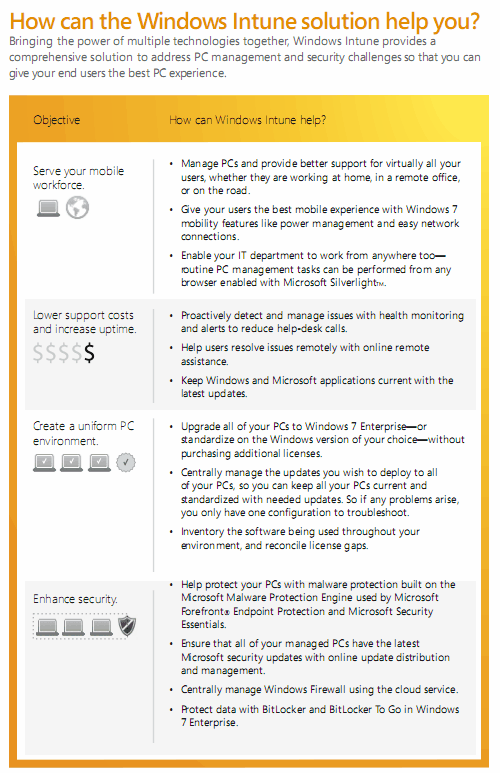
Microsoft has just announced the availability of Windows Intune Beta as part of Microsoft Online Services. Windows Intune is a cloud based PC management service for businesses and organizations. Microsoft calls it a “comprehensive solution that includes PC management, malware protection, Windows upgrades, and more”.
The Windows Intune cloud service gives IT professionals and system administrators the tools at hand to manage and secure PCs through a web-based console, which essentially means that it is possible to manage the PCs from any computer with Internet connection.
In order to use the service, you just need an Internet connection and the Windows Intune client installed on each PC you wish to manage. Windows Intune can be used by inhouse IT professionals to manage the PCs at their organization or by solution providers to manage the PCs of multiple businesses.
windows intune
Windows Intune offers the following feature set:
Windows Intune is currently offered as a limited beta, the first 10000 users who signup for the beta may participate.
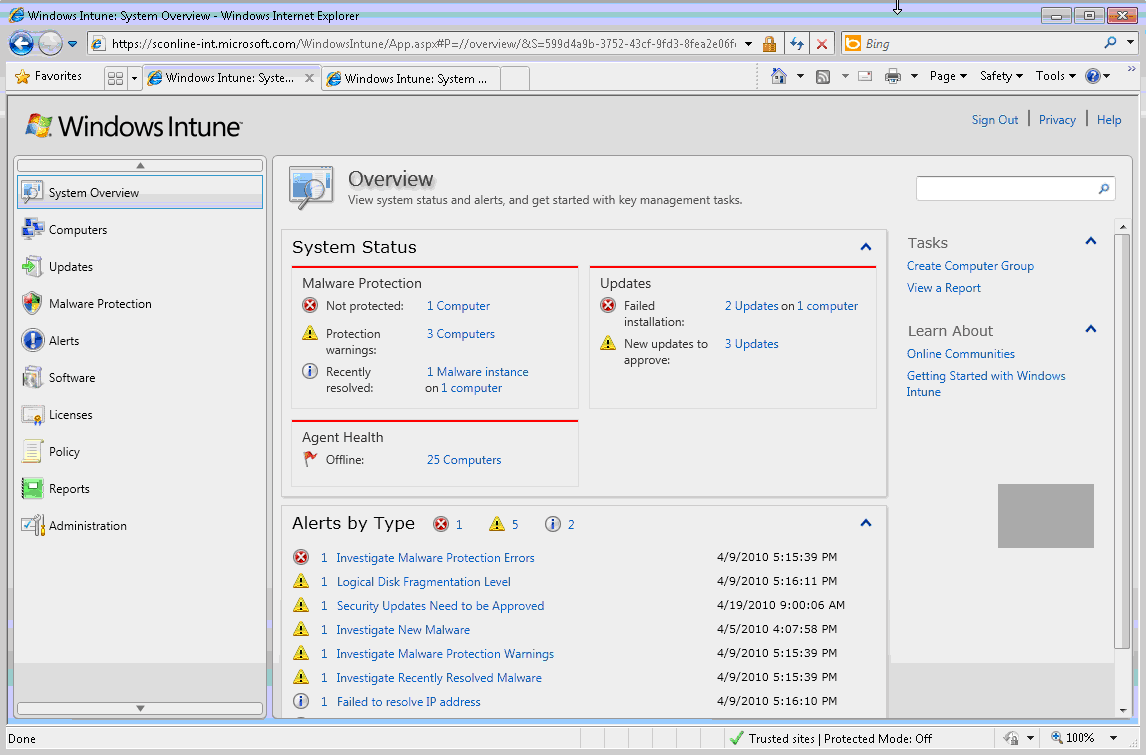
Windows Intune
Windows Intune requirements:
Windows Intune seems to lack several features at this point in time that are essential for system administrators and It Pros, including
Head over to the official website to try the beta right now.
© Martin for gHacks Technology News, 2010. | Permalink | Add to del.icio.us, digg, facebook, reddit, twitter
Post tags: intune, intune beta, microsoft online services, pc management, windows intune


